
- Trading
- Useful Tools
- About us
Trading FAQ
- Why was my position closed at the price, which was not on the chart?Page issue
The charts in the trading terminal are built based on the Bid price, but only long (Buy) positions are closed at the Bid price. Short (Sell) positions are closed at the Ask price.
As a result, your short positions will be closed at the price that is not displayed on the chart until you enable showing the Ask line in the chart settings.
- Why was the order closed without any actions on my part?Page issue
Your position could have been closed due to one of the following reasons:
- The margin level on your trading account reached the Stop Out value.
- The asset price reached the Stop Loss or Take Profit level.
- The Trailing Stop for your position was triggered.
- Why was my order executed not at the declared price?Page issue
Such situations may happen to Buy Stop, Sell Stop, and Stop Loss orders.
When these orders are triggered, the system sends the Market order, which is executed at the current price, which may differ from the declared price.
Other types of pending orders (Buy Limit, Sell Limit, and Take Profit) are mostly executed at the specified price, but sometimes at the better price, if such price exists on the market when they are executed.
- What is leverage?Page issue
The leverage is a ratio between the trader’s own funds and borrowed funds, which a trader borrows from his broker. 1:2 leverage means that for a transaction you must have a trading account with amount 2 times less than the sum of the transaction.
- How does the stop order work? Page issue
The Stop order is a requirement, and when it is met, the platform generates a corresponding order, Market or Limit.
- A Market order is created in case of Buy Stop and Sell Stop orders (orders to buy/sell an asset), and when the asset price reaches Stop Loss level (an order to close the position).
- A Limit order is created in case of Stop Limit order, when the asset price reaches Stop level specified in the order.
- Why can I not sell at the weekend?Page issue
Financial markets are not open on weekends.
- What types of pending orders are there?Page issue
A pending order is the client's order to buy or sell a financial instrument at the specified price in the future.
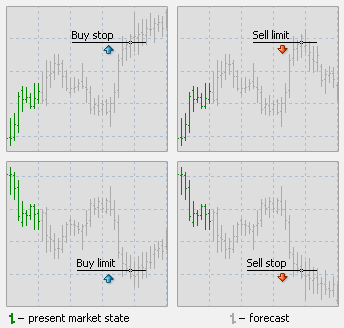
There are four types of pending orders:
Buy Limit — to buy, when the future "Ask" price is equal to the specified value. The current price level is higher than the value of the placed order. Execution of this type of order means that the transaction will be made at the price specified in the order or at the price that is lower. Orders of this type are usually placed in anticipation that the instrument price, having fallen to a certain level, will increase.
Buy Stop — to buy, when the future "Ask" price is equal to the specified value. The current price level is lower than the value of the placed order. Execution of this type of order means that the transaction will be made at the price existing at the moment when the order is executed, which may be different from the price specified in the order. Orders of this type are usually placed in anticipation that the instrument price, having reached a certain level, will keep increasing.
Sell Limit — to sell, when the future "Bid" price is equal to the specified value. The current price level is lower than the value of the placed order. Execution of this type of order means that the transaction will be made at the price specified in the order or at the price that is higher. Orders of this type are usually placed in anticipation that the instrument price, having rising to a certain level, will decrease.
Sell Stop — to sell, when the future "Bid" price is equal to the specified value. The current price level is higher than the value of the placed order. Execution of this type of order means that the transaction will be made at the price existing at the moment when the order is executed, which may be different from the price specified in the order. Orders of this type are usually placed in anticipation that the instrument price, having reached a certain level, will keep decreasing.
- Our pricingPage issue
Competitive trading fees across all markets
- Trading fees from 0,075%
- No fixed charges or minimum fees per trade
- Same pricing for all markets and instruments
Markup on the market spread
Instead of charging separate commissions for each order, our fees are included in the market spread. We apply a total markup to the market spread from 0.15% of the instrument’s value – from 0,075% per side. This markup is automatically included in the displayed price.
Market spread is the difference between the buying price (Ask) and the selling price (Bid) of an asset. Markup is the amount by which the Bid/Ask (Sell/Buy) prices are adjusted for our clients.
Example - stock trading at $200
BUY for $1 000 → our fee $0.75
BUY for $5 000 → our fee $3.75
BUY for $10 000 → our fee $7.50"Last Price: $200
Sell Market (Bid): $199.95
Buy Market (Ask): $200Markup = $200 * 0.15% = $0.30 = 30 pips
Bid price (for Sell orders with applied markup) = $199.95 - $0.30/2 = $199.80
Ask price (for Buy orders with applied markup) = $200 + $0.30/2 = $200.15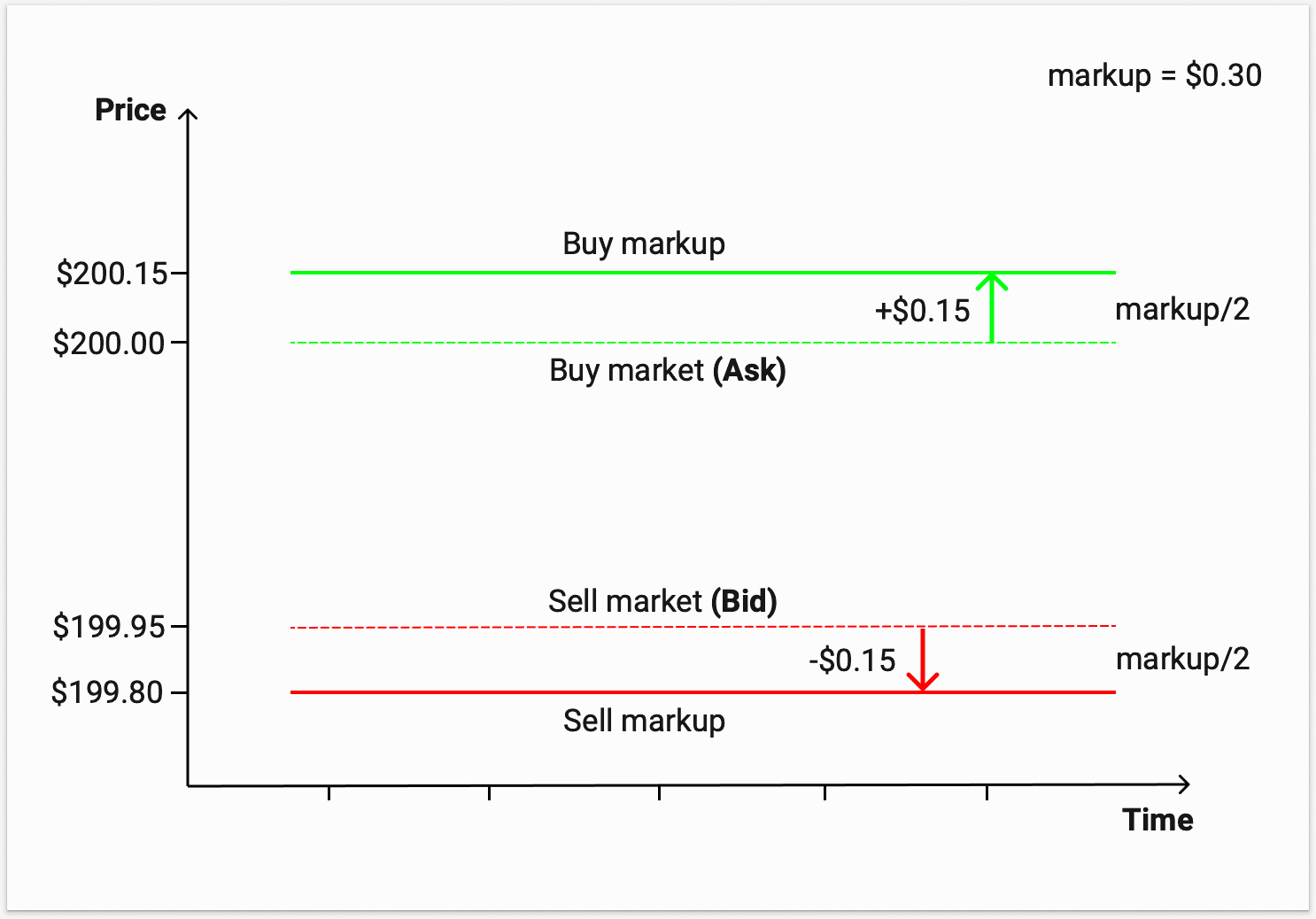
In this example, our fee (markup) of 0.075% per side is:
$0.15 for buying 1 share or $15 for buying 100 shares
$0.15 for selling 1 share or $15 for selling 100 shares
If the result of the markup calculation is an odd number, it is rounded up for subsequent division by 2. For example, if the last price of a stock is $167:
- 167 * 0.15% = 0.25 = markup is 26 pips
The applied total markup may exceed 0.15% due to possible rounding during the calculation process and with instruments trading at a lower price per share. Please refer to the financial instrument contract specifications in R StocksTrader for exact details on the applied markups and complete fee information.
- How to create a TradingView account?Page issue
Go to tradingview.com, click the member icon in the top-right corner, and then click the “Sign In” button to choose your preferred verification method. Don’t forget to get acquainted with the community, news, and market screeners.
- What browsers does TradingView support?Page issue
TradingView is compatible with all modern browsers and offers desktop and mobile apps that can be downloaded from here.
- How to make deposits and withdrawals after connecting to TradingView?Page issue
After connecting to TradingView, RoboMarkets will continue to manage all account transactions — including deposits and withdrawals — for your account.
- I want to practice trading without risking real money. How can I do it in TradingView?Page issue
You can use the Paper Trading feature, designed to execute simulated trades without risking real money. To practice trading using Paper Trading, open a chart, then open the Trading Panel and select Paper Trading. Please note that this type of trading does not reflect the nature of speed and order execution on an integrated account.
- Where can I find tutorials and guides for TradingView?Page issue
There are several ways to do that — you can always check the Help Centre for helpful information, ask for feedback through Support tickets, or inquire with RoboMarkets for assistance. TradingView also provide a wide array of content on its YouTube channel to help you — check it out here.
- How much does integration with TradingView cost?Page issue
Integration is free for TradingView clients; only standard brokerage fees and commissions apply. You can also purchase one of TradingView’s Premium plans for advanced traders.
- How can I trade stocks using the TradingView platform?Page issue
- Log in to TradingView and open the stock chart you want to trade.
- Click “Trading Panel” at the bottom and select RoboMarkets.
- Enter your RoboMarkets login credentials to connect.
- On the chart, enter the trade details (order type, quantity, etc.) and click “Submit.”
- Your order is now sent directly and executed by RoboMarkets.
- How can I trade ETFs using the TradingView platform?Page issue
- Log in to TradingView and open the stock chart you want to trade.
- Click “Trading Panel” at the bottom and select RoboMarkets.
- Enter your RoboMarkets login credentials to connect.
- On the chart, enter the trade details (order type, quantity, etc.) and click “Submit.”
- Your order is now sent directly and executed by RoboMarkets.
Ask
Our consultant will answer your question shortly.